
Creating a lean, fast, and lightweight Divi website isn't just about following SEO principles—it's about crafting an exceptional user experience that search engines naturally reward. The key is leveraging Divi's built-in features while being selective about additional plugins.
In today's digital landscape, where SEO advice seems to lurk around every corner, finding the right optimisation path for your Divi website can feel like navigating through a maze of conflicting information. While the internet is saturated with SEO guides, many fail to address the unique challenges and opportunities that come with optimizing Divi-powered websites. More importantly, they often overlook a crucial truth: when it comes to SEO, less is frequently more
The speed imperative: Why performance matters
The impact of website speed on user experience and SEO cannot be overstated. Consider these eye-opening statistics:
- A mere one-second delay in mobile page load can increase bounce rates by 123%
- Just 100 milliseconds of added delay can hurt conversion rates by 7%
- The ideal page load time is between 0-4 seconds for optimal user engagement
Critical Insight: Speed isn't just about user satisfaction—it's a direct driver of business success. But notice I don't say anything about speed and Google visibility.
Speed is extremely important for users. Many would have you believe that if your website wasn't loading in sub-second time you'd be relegated to the back of Google, but it's just not true.
You have to keep speed at the top of your list, but for user experience. Just because you have an extremely fast site doesn't mean you'll be in the top ten for your designated keywords. It also doesn't mean that you'll beat slower sites, so don't get hung up on it.
The very basics...but most important
There are a couple of important requirements for any Divi site, indeed, any WordPress site to ensure it can be found, indexed and ranked by Google, so let's go through those now.
Is your site discouraging search engines?
In your dashboard there's an option under "Settings" that will tell search engines to stay away and not index your website:
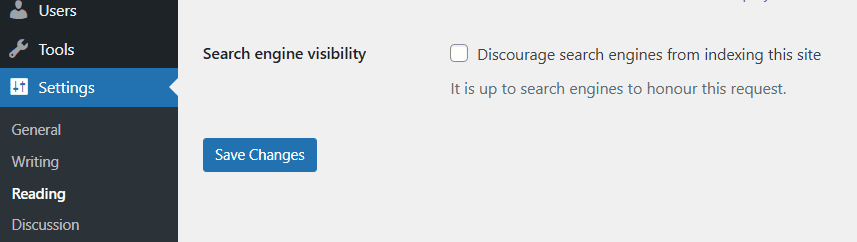
This tick box is usually set when you're creating a new website and you don't want all the new stuff to be found while it's being developed, but often, designers forget to un-tick it when the site goes live.
If your website was found in Google and then this tickbox is set, it will very soon disappear. I've seen websites lose 40% of their traffic due to this one error.
What this tickbox does is set an option in a text file called "robots.txt", for example, this website has one:
User-agent: *
Disallow: /wp-admin/
Allow: /wp-admin/admin-ajax.php
What this does is tell search engines what it can and cannot index.
You can get quite complex with it, for example, some people don't like AI bots indexing their site so they put stuff in it like this:
User-agent: Amazonbot
User-agent: Applebot-Extended
User-agent: CCBot
User-agent: ClaudeBot
User-agent: GPTBot
User-agent: Google-Extended
User-agent: GoogleOther
User-agent: Meta-ExternalAgent
User-agent: FacebookBot
Disallow: /
I honestly don't bother, share it all to everyone!
Key takeaway: Just make sure your site can be indexed, don't get hung up on complex robots.txt rules that may only have minimal impact.